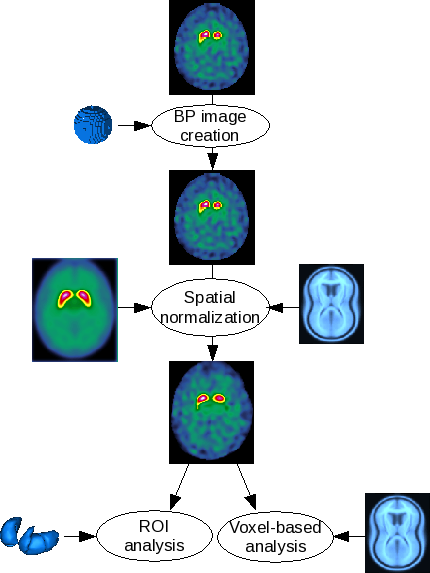
DaTscan analysis pipeline
DaTscan analysis pipeline
DaTscan analysis pipelineAutomatic statistical analysis for 123I-FP-CIT images.
The DaTSCAN pipeline allows a user to normalize 123I-FP-CIT images to a 123I-FP-CIT template and then to automatically analyze the normalized image.Method
123I-FP-CIT template specifications
The 123I-FP-CIT template has been built from normal scans of 10 subjects with essential tremor (mean age +/- SD = 64.4 +/- 12.5 y). They were acquired on a two-head gamma-camera (AXIS, Philips) equipped with LE-HR parallels collimators (120 projections over 360 degrees 128x128 matrix). Projections were reconstructed using the OSEM algorithm on a Odyssey station. The reconstructed volume was filtered using a Butterworth filter (order, 4 ; cutoff frequency, 0.35 cycle/pixel) and then corrected for attenuation. Native images were transformed in BP parametric images and then put into the MNI referential through SPM2. The normalized parametric images were symmetrized. The final template is the smoothed mean image of the 20 parametric 123I-FP-CIT images (gaussian filter, FWHM = 8mm).Binding potential (BP) parametric image
ROI
This step is the 123I-FP-CIT non-specific uptake measure with a spherical ROI, usually put on the occipital cortex at the axial slices containing the maximum striatal activity.Parametric image creation
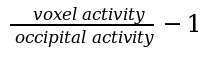
The parametric image is obtained by dividing each voxel intensity by the mean occipital activity, using the following formula:Spatial normalization
Estimation
The template allows to put the images in the Montreal Neurological Institute (MNI, http://www.bic.mni.mcgill.ca) without recourse to an anatomical image. Since the 123I-FP-CIT template has been built from parametric images of binding potentials, the images to be analyzed must be parametric : the previous step is mandatory. The spatial normalization is done by SPM8 or SPM12 (http://www.fil.ion.ucl.ac.uk/spm/software/spm8) with the SPM default settings.Statistical analysis
ROI
Due to manually segmented striatum ROI (right and left caudate nucleus ; right and left putamen), the following values are computed for each structure: mean BP ; ratios (right/left, caudate/putamen, ...) ; z-scores using a control group.Voxel-based
A second level analysis (two sample t-test) is computed: one subject versus a control group. The user has access to the following option: the threshold masking type and value ; the use of an implicit mask and/or an explicit mask. The subject (current subject and controls) ages are automatically used as a covariable.User interactions
Data import and conversion
The user could import the DICOM images by clicking on this icon:. Once an image selected, it is automatically converted in NIfTI format and then inserted in the database.
Non-specific activity ROI
A window will show the native image. The user is prompted to set the size of the sphere and then to click on the image to define the center of the sphere.Spatial normalization verification
After the spatial normalisation estimation, the user is advised to check the result : a window shows the normalized image, the template and a segmentation of the striatum of the two images (each object is shown in the three directions : axial, coronal and sagittal).Statistical analysis verification
For both analysis types, a window will show the subject and control group information and the statistical results. It will also show some visualization:
- ROI: an axial view with the normalized image and the striatum ROI
- voxel-based: three views (axial, coronal and sagittal) with the t-map blended with the MNI single subject MRI and the glass-brain
execution_presets: Choice ( input )
database: Choice ( optional, input )
data_type: Choice ( input )
VOI_stats_choice: Choice ( input )
analysis_space: Choice ( input )
PVC: Boolean ( input )
PVC_method: Choice ( input )
FWHM: Float ( input )
datscan_dicoms_directory: Directory ( optional, input )
datscan_dicoms_files: ListOf( Any Type ) ( optional, input )
datscan_nifti: SPECT native ( input )
VOI_stats: Subcortical labels ( input )
template: SPECT template ( input )The reference template
reference_group: SPECT group definition ( optional, input )
NSA_VOI: Non-specific activity ROI ( output )
all_reference_groups: Boolean ( input )
parametric_spect: SPECT parametric ( output )
normalized_spect: SPECT parametric ( output )
pvc_spect: SPECT parametric ( output )
output_statics_voi: SPECT quantitative analysis data ( output )
Toolbox : Nuclear Imaging
User level : 0
Identifier :
datscanPipelineFile name :
brainvisa/toolboxes/nuclearimaging/processes/datscan/datscanPipeline.pySupported file formats :
datscan_dicoms_directory :Directory, Directorydatscan_dicoms_files :Directory, ASCII results, AVI film, Aims bundles, Aims scalar features, Aperio svs, BMP image, BrainVISA session event, BrainVISA/Anatomist animation, Bucket, Bundle Selection Rules, Bval File, Bvec File, CSV file, Commissure coordinates, Config file, DEF Label Translation, DICOM image, Database Cache file, Directory, ECAT i image, ECAT v image, EPS file, FDF image, File, Filter file, FreesurferAvgCurv, FreesurferCurv, FreesurferCurvPial, FreesurferIsin, FreesurferLabel, FreesurferMGH, FreesurferMGZ, FreesurferParcellation, FreesurferPial, FreesurferSphereReg, FreesurferThickness, FreesurferWhite, GIF image, GIFTI file, GIS image, Graph, Graph and data, Gyri Model, HDF5 File, HTML, Hamamatsu ndpi, Hamamatsu vms, Hamamatsu vmu, Hierarchy, Histo Analysis, Histogram, Info file, JPEG image, JSON file, Label Translation, Leica scn, Log file, MESH mesh, MINC image, MINC transformation matrix, MIRAX mrxs, MLP classifier, MNG image, MNI OBJ mesh, MP4 film, MPEG film, Matlab file, Matlab script, Minf, Moment Vector, Mrtrix tracts, NIFTI-1 image, Numpy Array, OGG film, PBM image, PDF File, PGM image, PLY mesh, PNG image, PPM image, PS file, Phase image, Plot results, Process execution event, Python Script, Quality Check Report, QuickTime film, Referential, SNNS pattern, SPM image, SQLite Database File, SVG file, SVM classifier, Sakura svslide, Selection, Series of BMP image, Series of FreesurferLabel, Series of GIF image, Series of GIS image, Series of JPEG image, Series of MNG image, Series of PBM image, Series of PGM image, Series of PNG image, Series of PPM image, Series of SPM image, Series of TIFF image, Series of TIFF(.tif) image, Series of XBM image, Series of XPM image, Sigraph Learner, Soma-Workflow workflow, Sparse Matrix, TIFF image, TIFF(.tif) image, TRI mesh, TSV file, Template model, Template model domain, Text Data Table, Text file, Texture, Trackvis tracts, Transformation matrix, Tree, VIDA image, Ventana bif, XBM image, XLS file, XLSX file, XML, XPM image, YAML file, Z compressed ECAT i image, Z compressed ECAT v image, Z compressed GIFTI file, Z compressed GIS image, Z compressed MESH mesh, Z compressed MNI OBJ mesh, Z compressed PLY mesh, Z compressed SPM image, Z compressed TRI mesh, Z compressed Texture, Z compressed VIDA image, ZIP file, Zeiss czi, bz2 Matlab file, gz Matlab file, gz compressed ECAT i image, gz compressed ECAT v image, gz compressed GIFTI file, gz compressed GIS image, gz compressed MESH mesh, gz compressed MINC image, gz compressed MNI OBJ mesh, gz compressed NIFTI-1 image, gz compressed PLY mesh, gz compressed PS file, gz compressed SPM image, gz compressed TAR archive, gz compressed TRI mesh, gz compressed Texture, gz compressed VIDA image, gzipped XML, mdsm file, pickle file, siRelax Fold Energydatscan_nifti :NIFTI-1 image, NIFTI-1 imageVOI_stats :NIFTI-1 image, NIFTI-1 imagetemplate :NIFTI-1 image, NIFTI-1 imagereference_group :XML, XMLNSA_VOI :Graph and data, Graph and dataparametric_spect :gz compressed NIFTI-1 image, NIFTI-1 image, gz compressed NIFTI-1 imagenormalized_spect :gz compressed NIFTI-1 image, NIFTI-1 image, gz compressed NIFTI-1 imagepvc_spect :gz compressed NIFTI-1 image, NIFTI-1 image, gz compressed NIFTI-1 imageoutput_statics_voi :JSON file, JSON file